1. Sierra Leone Orange - Dial
to complete making a deposit
2. Uganda MTN (1) - Dial
3. Uganda MTN (2) - Dial
4. Uganda Airtel - Dial
5. Tanzania Airtel - Dial
6. Tanzania Tigo Pesa - Dial
7. Tanzania Vodacom - Dial
8. Tanzania HaloPesa - Dial
9. Kenya MPesa - Dial
10. Zambia MTN - Dial
11. Zambia Airtel - Dial
12. Nigeria MTN MoMo - Dial
13. Ghana MTN - Dial
STOP
_____________________________
In order to access the voucher section, you must first log into your betting account.
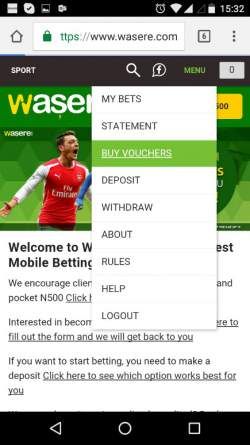
1. To access the vouchers, click on ‘Menu’ and Buy ‘Vouchers’
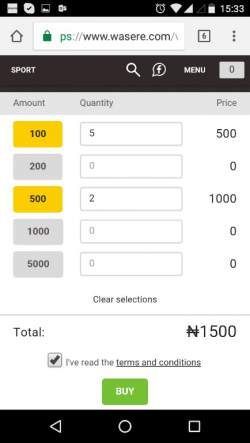
2. You can now choose which denominations you wish to purchase. In below example the agent has purchased 5 x N100 and 2 x N500 at a total cost of N1500.
After having read the terms and conditions and ticked the box, click ‘Buy’.
Immediately after clicking ‘Buy’ you will be able to see the voucher codes.
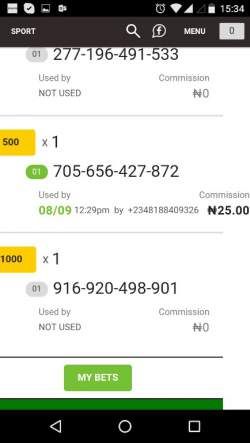
3. You can at any time click on ‘My Vouchers’ to see all your voucher purchases. Each line will show you one purchase, and how many of your vouchers are either Open or Used.
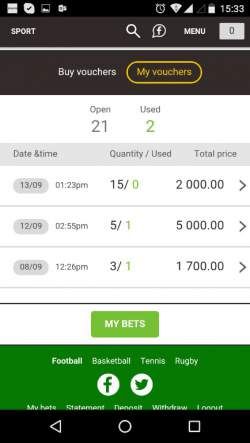
4. When you click on the line of a purchase you will see a breakdown of that purchase, as well as information on its status as either Not Used/Used. If a voucher has been sold, you will see the commission credited to your account.
Each 12-digit Voucher number is unique and can only be used once.
Redeeming a Voucher
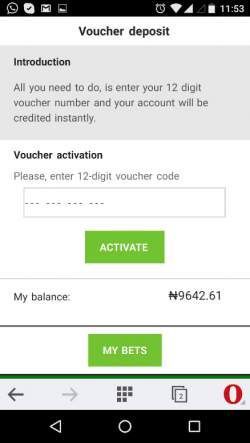
1. Have the client login to his betPawa account, go to the ‘Deposit’ page and choose ‘Voucher – Click here to enter a voucher number’.
Or type the direct link to the page: betpawa.ng/voucher
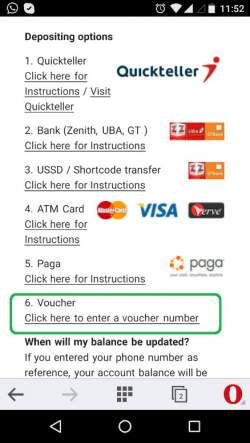
2. Now simply have your client enter the voucher number, click ‘Activate’ and the amount is instantly credited.